Facebook Instagram Pinterest TeachersPayTeachers BlogLovin Home Image Map

April 26, 2012

Is There a Doctor in the House?

Feel Better Frog from Manhattan Toy
We're learning all about doctors and nurses here at Small Talk this week, so what better time to bring out another one of my favorites:  Feel Better Frog!  If you're not familiar with this toy, let me fill you in.  This poor little frog is not feeling well, but has all the accessories to help him get better in no time!  He sneezes or blows his nose when you hold the tissue to his face, slurps soup off the spoon, and tells you if he has a fever or not when the thermometer is in his mouth.  He even tells you when he's hungry!  Kids and parents alike find this toy hilarious and engaging. I usually add my Fisher Price Doctor Kit to the mix, and then we can check poor Froggie's ears, give his a shot or two and listen to his heart.  Playing doctor is a great way to introduce new vocabulary and practice lots of language goals!


To go along with this theme, I made a Patient Chart using Boardmaker.  We talk about who the patient is, what happened to him, what we did to make him feel better, and what instructions we gave him to do at home.  I help the child complete the chart by showing him a page of choices for each question on the chart.  We review/name each of the choices and select one to put on the chart.  When the chart is complete, I have the child tell about the patient he treated, using the chart as prompts.


For example, the child might say, "Teddy Bear came to the doctor today.  He fell off his bike and hurt his knee.  I put a bandaid on it.  I told him to go home and rest."

If you'd like to download my charts and choices, you can find them at these links:  Chart Choices, Chart Choices 2 and Patient Chart.  Sorry for the multiple downloading, but I posted these before knowing how to link PDF's together in one file.  Oh well, they're free, right?

Another great way to work on sequencing, vocabulary and language skills is to make an interactive story of the child pretending to be a doctor using your iPad or iPhone.  There are several great apps that allow you to take photographs within the app itself and then use them to create a story, but the one I used today was Stories 2 Learn by MDR.  It's easy to use and a story can be completed quickly.  Check it out in the App Store.


Just take a picture of the child using your iPad or iPhone, or import a photo from another camera.  Add the text by typing in the text box, and audio if you desire.  Save your page, and add another.  Your story can be as long or as short as you want it!  The pages of the story look like this:


Kids just love to be the stars of their own stories, and this is a great way for them to work on their speech/language skills, too!

Nice chatting with you!

Pam


April 17, 2012

Vroom! Vroom!

It's time to roll out the cars and trucks and things that go here at Small Talk!  This month our theme is Community Helpers/Cars and Trucks.  What better way to get started than pulling out the City rug and a bin full of vehicles?  

I bought this rug at Home Depot many years ago and it still is a favorite with my preschool kiddos.  It features roads that take you to many places in the city, including the hospital, police station, fire station and post office.

I made a "map" to help us get to all the places we need to go.  I took pictures of all the destinations on the rug and then used Boardmaker to make cards for my map.  I punched two holes in the top of each card and used metal rings to hold them together.  We select a vehicle and a place to start on the rug, and then flip to the first page of our map book.  We drive our vehicle to the place that matches the picture.  This is where you get to be creative.  Depending on the goals I'm working on, sometimes the child needs to answer a couple of questions about the place we're visiting, or sometimes I have him or her list three things they might see there.  We always talk about who might work there, or what you might do if you were there.  You can also work on negatives (ex. "This is not the post office"), and a whole host of other language concepts.  I also use it to work on articulation skills by placing stacks of picture cards on each location and having the child say the target words before moving onto a new location. 

I took individual pictures of the locations on the rug and imported them into Boardmaker cells to make the pages of the map book.

An example of a city location and it's matching map card.

If you have this rug and would like copies of my photographs, download them here:

Car Rug Destinations 1
Car Rug Destinations 2
Car Rug Destinations 3

Nice chatting with you!

Pam


April 10, 2012

Move and Talk: Story Templates for Tapikeo HD

Last month, I shared with you how I used the Tapikeo HD app to create an interactive activity in one of my treatment sessions.  Many of you showed interest in that particular activity, so together with Takikeo's developer, Jean-Eudes Lepelletier, I created a couple of free templates for treatment activities to share with you.  These templates have been made available on Jean-Eudes' website and Facebook page and right here on my blog!

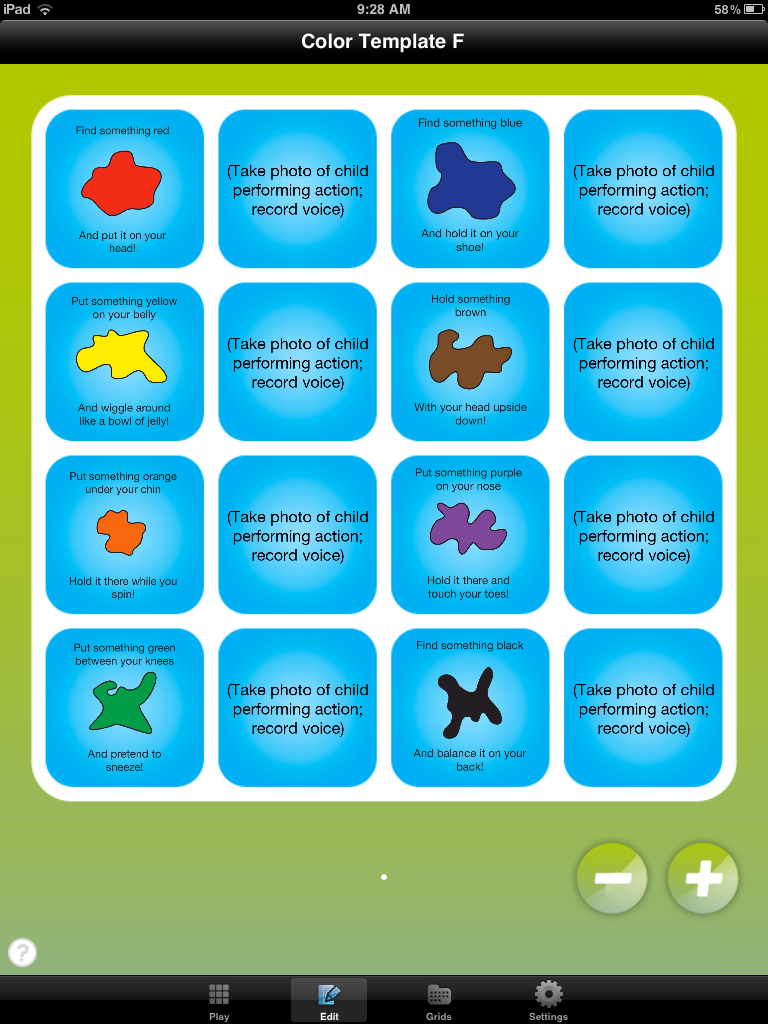
The first is called Move and Talk: Colors.  It is a little story that incorporates following directions, colors and movement, and can be customized to target specific speech and/or language goals.  This is how I use it:

Move and Talk: Colors Template as it appears when you download it onto Tapikeo HD

After downloading the grid from the server and opening it in my Tapikeo app, I am ready to make it my own.  First, I find it in the "Your Exports" section of the Grid Manager.  I select "Import", which moves a copy of the template to the "Your Grids" section of the Grid Manager.  I select the template then go to Grid Settings to rename this story.  Then I press "done" and am ready to create my story.  Next, press "Select and Play, and then press "edit", which you will find at the bottom of the screen.

Cell 2 - Customization
Cell 1 - Direction for the Child


I show the child the first cell, and read the text.  While the child finds a red object, I touch the second cell.  (By the way, I usually collect objects of various colors beforehand and keep them in a large basket that is accessible to the child.  This saves a bunch of time!)  I touch the "new" button to take a picture of the child performing the action.  This photo will become page 2 of our story and will replace the text or photo that appears in this cell as a template.  I then ask the child to say a target word, phrase, or sentence, and record him or her saying it.  For this example, the child said "Red on my head", because we were working on using the final /d/ sound.  We play it back to review, and if we are satisfied, I touch "done", which takes us back to the main grid.  I repeat this sequence for each of the colors in the story until it is completed.

Example of a  template cell in Play Mode
Example of a customized cell in Play Mode


When all the cells are completed, you are ready to play back your story.  Touch "play" at the bottom of the screen, and touch the blinking cell in the upper left corner of the grid.  That's it!  Easy!  And completed in less than 15 minutes.

The second story is one I use with my /r/ kids, to increase the level of difficulty while they practice saying target words in phrases and sentences.  It is called Move and Talk: Final AR.  This is what it looks like:

Move and Talk: Final AR Template

 Use this template in the same way as described for the Move and Talk: Color story, except record the child saying the target phrase or sentence as directed in the story.

Move and Talk:  Final AR grid with photos added


Template text disappears when you add a photo to the grid;  Add your own text by typing it in during the customization process.


So what do you think?  Do you like these?  If so, you can download one or both of them here (once you purchase the Tapikeo HD app):

Move and Talk: Colors
.tpk file:  http://bit.ly/MoveWithColorsTpk
web version:  http://bit.ly/MoveWithColorsInternet

Move and Talk: Final AR
.tpk file:  http://bit.ly/MoveTalkFinalAR_Tpk
web version:  http://bit.ly/MoveAndTakFinalAR_Web


If you don't already have the Tapikeo HD app, now is a great time to get it, because the 3.0 version is just being released.  You can purchase it through the App Store today!

I'd love your feedback on these templates.  I've been enjoying using them with my kids, and their parents absolutely love them!  I've got some other ideas in the works too; let me know if you want me to share them.

By the way, can you tell I just love Tapikeo HD?  It can be used SO MANY different ways with every child and family on my caseload.  The possibilities are endless!  A HUGE thanks to Jean-Eudes for creating this fabulous treatment tool!

Nice chatting with you!

Pam

March 30, 2012

My Five Favorite Games

During one of the online continuing education courses I viewed, the presenter showed a photograph of a speech language pathologist standing in front of a WALL of board games.  The caption asked, "Are you THAT therapist?"  I had to respond, "YES I AM!!!!"  I LOVE playing games!  I use them all the time during my treatment sessions.  No shame there!  They keep kids engaged and offer a higher level of difficulty in which to practice their new skills.  Here's my top 5:


1.  Cariboo by Cranium

Kids never tire of playing with this game.  Six colored balls are hidden inside the game.  The child searches for the balls by drawing a card and finding a door that matches the color, number or letter on the card.  The child then opens the door using a key.  If there is a ball under the door, the child places it in the hole that leads to the treasure chest.  After all 6 balls are found, the treasure chest "magically" opens!  Sheer delight, over and over and over again!  I use this game to work on a whole host of goals: plurals, speech sounds, sentence formulation, requests, turn taking, etc.  I've even changed the pictures on the doors by placing my own picture cards over the top of the others.

2.  Richard Scarry's Busytown: Eye Found It!


This one's a large board game that needs to be played on the floor.  Kids take a trip through Busytown on their way to have a picnic on Picnic Island.  Along the way, they stop and search for items hidden all over Busytown.  Some hungry pigs threaten to ruin the picnic by eating some of the picnic food during the journey...can we make it there before they eat it all?!  It's a different journey each time we play.  Great fun, and language opportunities abound!


3.  Froggie Boogie


Blue Orange Games make wonderful, colorful all-wooden games that I can't seem to get enough of!
This is one of my favorites.  Those sneaky baby frogs are trying to make their way around the pond while the mommy frogs are napping.  Kids roll the color dice, find a mother frog that matches the colors, and look under one googly eye.  If there's a frog on the eye, the mother "caught" them and they have to stay on their lily pad.  If the eye is blank, they can hop forward to the next lily pad and take another turn.  I use this one for articulation, color matching, turn taking, and language skills.


4.  Cat and the Hat I Can Do That

This is an excellent game for incorporating movement into speech and language activities.  The yellow "trick-a-ma-stick" is set up on the floor, and a variety of Cat in the Hat inspired objects are displayed on the table.  The child turns over three cards which give him a direction to complete.  The first set of cards state an action to be performed, the second tells which object to use, and the third tells which body part to use.  For example, a direction might be, "Step over the trick-a-ma-stick with the cake on your head."  I adapt this to work on various levels of direction following, from simple to complex.
 5.  Snail's Pace Race

This is another one that can be adapted in a multitude of ways.  Snails race against each other across the board to reach the finish line.  The child rolls the color dice to see which two snails get to inch forward one space each turn.  The unique thing is that the SNAILS are the competitors, not the people playing the game.  There are no winners or losers!  I mostly use this game with my preschoolers, but even the 10 year olds love the suspense of the race!

So there you are.  Fun, fun, fun!

What are some of your favorites?  I'd love to hear, so leave me a comment.  And then I might have to take a trip to Target...

Nice chatting with you!

Pam


March 28, 2012

Joke of the Day Activity Download

 April Fool's Day is coming soon, so why not get your Inner Comedian on and start telling some jokes?  Many of my kiddos struggle with those tricky multiple meaning words though, and my jokes are lost on them!  Here's something I'm going to try to help them "get the joke".  We'll choose a joke and glue it in the "Joke of the Day" square.  Next we'll figure out which word or words in the joke have more than one meaning.  We'll write those words on the sheet, write out the two different meanings and maybe even sketch little objects to go with it.  Then we'll talk about why the play on words is funny.  I'm thinkin' we'll be yucking it up in no time!

Why did the whale eat the dolphin?  It wasn't on porpoise!  

You can download my jokes (Courtesy of Uncle John's Book of Fun) and the worksheet here.

Nice chatting with you!

Pam

March 25, 2012

Zoo Part 2


Here's a couple more ideas that fit the zoo theme:

Monkeying Around Game

I've had this game for years, and it never fails to please kids of any age.  Kids take turns hanging monkeys by their tails onto the magnetically attached treetop that looms above an alligator-filled pond.  If the treetop becomes unbalanced, all the monkeys fall into the perilous pond with a grand crash!  I have used this game for all sorts of goals:  articulation practice, plurals, making predictions, and turn-taking, to name a few.

I think I bought mine at Super Duper, but I've seen it since at many toy stores.  It's just another great multi-purpose game that you can grab and adapt.

What's for Lunch Book

Here's a little book I made using Boardmaker for my preschoolers.  It's an interactive rhyming story about a zookeeper who has a wheelbarrow full of food to feed the animals.  The food pieces are attached to a separate story board (see the picture above), and placed into the bowl of the animal who requests it throughout the story.

 Here's a sample page:


And another:


You get the idea.  Just download it, print, add some velcro dots and you're good to go!  Here's a little time-saving tip:  Print the book pages on photo paper instead of card stock and you can eliminate the laminating step.  Easy.

I posted this book before knowing how to compile the Boardmaker files into one document, so unfortunately you'll have to download it page by page, until I can redo it.  Download the pages here:


Nice chatting with you!

Pam


March 21, 2012

Excellent Online Continuing Education: Advanced Healthcare Education

I thought I'd share a great source of online continuing education with you today.  It is called Advanced Healthcare Education, LLC, and their website is www.videoce.tv.  They provide online video presentations for a wide variety of healthcare professionals, including speech language pathologists and SLPA's, occupational therapists and COTA's, physical therapists and PTA's, and nurses and school healthcare providers.

I have completed two courses through this company and both were excellent in content and value.  After downloading each session, I was able to play them on my own time schedule from the comfort of my home.  In addition to the video presentations, each session incudes written material that is easily downloaded and follows along with the speaker's presentation.  At the end of each session, you are required to pass a brief examination before earning your CEU's.  You are then given a certificate of completion, with the number of CEU's printed on the certificate.

According to their mission statement, "AHE, LLC has a mission to provide high quality, highly relevant and in-depth live and online continuing education courses to healthcare professionals using high level technology for online viewing."  My experiences with them so far tell me they are right on track.  Their list of available live and online conferences is extensive, with many different topics from which to choose, and I experienced "no technical difficulties" in either of my courses.  Sound interesting?  Check them out!

Nice chatting with you!

Pam